Lockscreen Drawing
- 3.9
- Rating
- 1.00M
- Installs
- Free
- Price
 Analysis by App-foxy
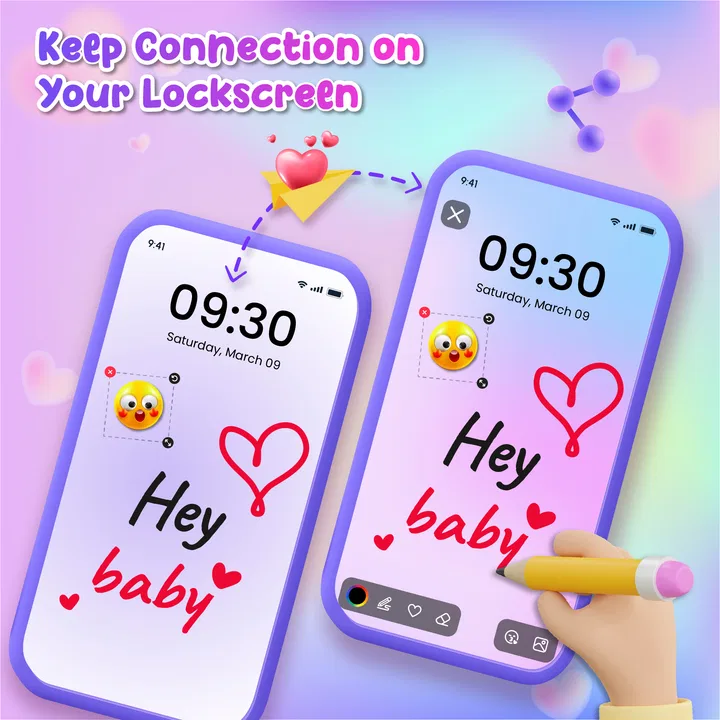
I like personalization apps that change how I use my phone rather than simply adding another wallpaper. Lockscreen Drawing takes that more interactive route: it turns the lock screen into a place where I can leave a quick drawing, a note-like gesture, or a small visual message for someone else. That makes it more personal than choosing an image, although it also means the experience depends on how comfortably the app fits into the phone’s normal unlocking routine.
After spending time with it, I see this as a playful creativity tool in the Personalization category, not a replacement for a full note-taking app or a serious digital art studio. Its appeal is the short distance between an idea and something visible on the lock screen. I can make a simple mark, use it as a private reminder, or create something for a family member to discover. The concept is easy to understand, but the practical value comes from using it with a clear purpose instead of treating it as a novelty for a few minutes.
From a blank lock screen to a personal message
Lockscreen Drawing is made by EZTech Apps and is available as a free app for Everyone. It runs on Android 7.0 and later, which makes it accessible to people using older compatible phones as well as newer devices. The current version is 1.1.1, and the app has already passed one million installs, so it is not an obscure experiment that only works for a tiny audience. Its average rating is 4.1 from around 3.4 thousand ratings, a useful sign that the basic idea works for many people while still leaving room for individual differences in comfort and expectations.
You May Also Like

 Blood Strike: 2.5 Anniversary
Blood Strike’s Loadouts Turn Every Drop Into a Tactical Gamble
A close look at Blood Strike’s custom loadouts: how fast access to signature weapons reshapes its battle royale rhythm, rewards preparation, and narrows the gap between fights.

 Pandora - Music & Podcasts
Pandora’s Music Is Easy to Start, but Harder to Recover
Pandora’s strength is its low-effort path from a seed to a station. Its weak spot is how much confidence it asks you to place in connection, setup, and quiet recovery.

 8 Ball Pool
 Is Built on Rivalries, Rematches, and Routine
A close look at the rivalries, rematches, shared routines, and unanswered safety questions that turn a quick pool match into a persistent mobile community.

 Samsung Music
’s Quiet Strength Is Playing What You Already Own
Its reach comes less from spectacle than from dependable access to a personal library. That simplicity is both the app’s strongest retention engine and its ceiling.

 AccuWeather: Weather Radar
AccuWeather Review: A Quick, Clear Forecast for Everyday Decisions
For everyday plans, the best forecast is the one you can understand quickly. AccuWeather makes rain timing, radar, and local conditions easy to act on, with a few trade-offs.

 Hill Climb Racing
Why Hill Climb Racing Still Turns Crashes Into One More Run
A tiny car, a bumpy hill and one more upgrade: Hill Climb Racing keeps resurfacing because its simple chaos makes every near-miss feel personal.
More From Our News Desk



The starting condition is simple: I have an ordinary lock screen and want it to feel more expressive. A normal wallpaper gives me a finished picture, while a conventional reminder app asks me to open the phone before I can see or edit anything. This app sits between those two habits. The lock screen becomes the destination for a drawing, so the act of checking the phone can also become a small moment of communication or creativity.
That distinction matters in everyday use. If I want a detailed illustration, I would choose a proper drawing app with more room and more control. If I need a dependable task list, I would use a reminder tool with structured entries. Here, the strength is immediacy. The result can be informal, visual, and quick enough for a thought that does not deserve a full document.
Setting up the first drawing without overthinking it
My recommended starting point is to create something deliberately simple. A short handwritten word, a symbol, a smiley face, or a small sketch is easier to judge on a lock screen than a complicated composition. The screen is encountered briefly, often while I am in motion, so a strong shape is more useful than fine detail. This is one of the first non-obvious trade-offs: the app invites creativity, but the best lock-screen drawings usually behave more like signs than paintings.
I would also begin with a drawing that has a clear job. For example, I might make a small coffee-cup symbol to mark a morning routine, draw a heart for a partner, or leave a cheerful message for a child using the same phone. That purpose helps me decide whether the drawing should be decorative, readable, funny, or private. Without that decision, it is easy to spend time making marks that look interesting in the editor but feel confusing when seen quickly during the day.
The free price makes experimentation easy, but the app includes in-app purchases ranging from $7.99 to $39.99 per item. I would therefore explore the basic workflow before considering any paid option. A person who only wants occasional sketches should think carefully about whether extra purchases match their actual use. The central idea should be enjoyable on its own; payment makes more sense for someone who expects to use the personalization regularly and finds the additional value worthwhile.
How I would use it in a real household
Imagine a parent leaving the phone on a kitchen counter while getting ready for work. Instead of sending a message that requires opening a chat, they create a bright, simple drawing that says “school” through a backpack symbol or reminds a partner about an evening plan with a small clock. The other person sees it when the screen wakes. The handoff is visual and immediate, but it remains casual rather than becoming another formal notification.
That scenario shows where the app feels different from a standard wallpaper. A wallpaper is usually chosen once and forgotten. A drawing can be changed when the situation changes. It can carry a little context from one person to another, especially when the phone is shared or placed somewhere visible. The limitation is just as important: the message is only useful if the intended person actually sees the lock screen, and it should not replace a time-sensitive communication method.
For couples or close friends, the app could become a small daily ritual. One person leaves a sketch, the other replaces it later, and the lock screen becomes a rotating visual conversation. I would keep the drawings bold and recognizable so the exchange does not become a frustrating guessing game. This is a better fit for affection and play than for information that must be precise.
The handoff between drawing, viewing, and responding
The most interesting part of the workflow is the handoff. I create the content in an app, but the other person encounters it in a different context: the lock screen, usually during a quick glance. That means the drawing has to survive a change in attention. A design that looks charming while I am focused on it may be too subtle when seen for only a moment.
I found that contrast and spacing matter more here than artistic skill. A large central symbol is easier to understand than several tiny details. Short marks work better than a crowded scene. If I am making a message for someone else, I would test it from a distance and in the lighting where the phone is normally kept. This is a practical habit that a store summary would never tell me, but it makes the difference between a useful handoff and a confusing one.
There is also a social handoff to consider. A drawing that feels funny to me may look strange to someone who does not know the context. Before using the app for a shared family phone or a device that other people regularly see, I would choose a neutral first design. The app is personal, but the lock screen is not always private. A playful sketch can become awkward if it appears in a workplace, during a meeting, or in front of someone who was not meant to interpret it.
For a child, the visual approach can be more inviting than a typed reminder. A parent could leave a simple drawing that represents a routine, while the child later creates a response. However, I would keep expectations realistic. This is not a substitute for supervision, a calendar, or a safety alert. Its value is in making a familiar device feel warmer and more engaging, not in managing important responsibilities.
What the finished result feels like
When the workflow succeeds, the result is small but satisfying: the phone no longer feels completely generic, and the lock screen carries something I made rather than something selected from a gallery. The emotional effect is stronger than the technical complexity. A quick doodle can feel like a message from a person, especially when it is tied to a shared joke or a recurring habit.
I also appreciate that the result can be temporary in spirit. I do not need to commit to one visual identity for the phone. I can change the drawing when a mood, event, or conversation changes. That makes it more flexible than a traditional wallpaper, while still being less demanding than maintaining a collection of polished designs.
The app is especially appealing to people who enjoy handwritten touches. Someone who already uses stickers, custom wallpapers, or small sketches in messages will probably understand the attraction quickly. It is also a good choice for users who want a personalization tool with a direct visual outcome rather than a large library of decorative themes.
On the other hand, the result may feel too limited for people who want a highly polished phone interface. If my goal is a professional-looking home screen, an animated wallpaper, or a carefully coordinated icon theme, a drawing-focused lock screen may not be the best route. The app’s charm comes from informality, and that same informality can look unfinished if I expect design-system precision.
Where the usual alternatives do a better job
Compared with a wallpaper app, Lockscreen Drawing gives me authorship instead of only selection. I am not limited to finding an image that matches my taste; I can create a visual that relates to a specific moment. The trade-off is that a wallpaper app usually offers more polished material immediately, while my own drawing may require experimentation before it looks good.
Compared with a notes app, this tool is faster to recognize at a glance but weaker for storing information. A note can hold several lines, a checklist, or detailed instructions. A lock-screen drawing is better for a symbol, a mood, or a compact reminder. I would use the drawing for “bring umbrella” only if a clear umbrella icon is enough; for a list of errands, I would choose a notes or task app instead.
Compared with messaging, the app creates a quieter form of contact. It does not carry the same expectation of an immediate reply as a chat conversation. That can be a benefit for a gentle greeting or a shared joke, but it is a weakness when timing matters. If I need someone to confirm a plan, I would send a message and use the drawing only as an extra personal touch.
Compared with a full drawing application, it is more focused and less intimidating. I do not need to open a large canvas just to make a small mark for the lock screen. Yet a dedicated art app remains the better choice for layers, detailed editing, or work that I want to save and develop. The decision is not about which app is universally better; it is about whether the final image belongs on a lock screen or in a creative project.
Where the flow can break down
The first point of friction is the phone itself. A lock screen is a busy, highly visible surface, and the drawing has to coexist with the device’s normal glance-based information. If the result competes with other lock-screen elements, it may lose its impact. I would avoid placing important visual information where it can be covered or overlooked, and I would treat the drawing as an enhancement rather than the only place for something essential.
The second issue is repetition. The first drawing feels novel, but changing it often may become a chore. People who enjoy frequent customization will see that as part of the fun; people who want a set-and-forget setup may stop using the app after the initial experiment. This is a key situation where I would not recommend it: if I rarely want to alter my lock screen, a standard wallpaper is simpler and demands less attention.
The third issue is precision. Hand-drawn communication can be ambiguous, especially when a symbol has several possible meanings. A small sketch may look different on another device or under different viewing conditions. I would never rely on it for passwords, urgent instructions, medical information, or anything that could cause trouble if misunderstood. The app works best when the consequences of interpretation are light.
Purchases are another point to consider. Because the app is free to start but offers individual in-app items from $7.99 up to $39.99, I would avoid assuming that every useful part of the experience is included at no cost. Before spending, I would ask whether the purchase improves a workflow I already enjoy or merely extends a novelty. That simple test protects the value of the free download.
There is also a personal privacy judgment. A drawing intended for one person can become visible to anyone who sees the phone. I would not place sensitive personal information, private names, or revealing plans on the lock screen. Even a harmless-looking design can expose more context than intended if the device is left on a desk or passed around. The safest use is expressive rather than confidential.
Who should try it, and who should skip it
I would recommend this app to someone who likes doodling, wants a more personal lock screen, or enjoys leaving small visual messages for people at home. It is particularly suited to casual creativity, family rituals, and expressive reminders that do not need a long explanation. The Everyone age rating also makes its basic concept approachable for a broad audience, although adults should still decide how a shared device is used.
I would be more cautious about recommending it to a person who wants productivity above all else. If I need reliable scheduling, searchable notes, recurring alerts, or a structured record, this is the wrong tool. The drawing may make a reminder more noticeable, but it does not turn the lock screen into a full task-management system.
Artists looking for advanced control may also outgrow it quickly. The attraction is the direct path from a quick idea to a visible lock-screen result, not a deep professional workspace. Likewise, people who prefer a clean, static interface may find the central concept unnecessary. In those cases, a conventional wallpaper or the phone’s built-in personalization controls will probably be less distracting.
My practical verdict after following the whole workflow
Lockscreen Drawing succeeds because it connects creation with visibility. I begin with a blank or ordinary lock screen, make a compact visual, let it pass through the phone’s normal viewing routine, and end with something that can communicate a feeling or idea at a glance. That complete path is more meaningful than the drawing tool alone. It gives personalization a small social purpose.
My advice is to treat each drawing as a sign with a job. Use strong shapes, keep messages short, check the result from a normal viewing distance, and avoid information that must be exact or private. For shared use, agree on the meaning of recurring symbols so the handoff feels natural instead of confusing. These habits make the app more useful without demanding much time.
The free entry point makes it easy to see whether the idea fits your routine, while the optional purchases mean I would evaluate upgrades slowly rather than buying on impulse. The app is not trying to replace wallpapers, notes, messaging, or art software, and it should not be judged as though it were designed for those roles.
For me, the best reason to install it is not to decorate every screen with elaborate artwork. It is to add a small human gesture to a device I check constantly. If that sounds appealing, Lockscreen Drawing is a worthwhile personalization experiment. If you want a polished theme, a dependable reminder system, or a serious drawing canvas, I would choose a more specialized alternative and leave this one for moments when a simple sketch says enough.
FAQs for Lockscreen Drawing
01What is Lockscreen Drawing and how does it work?
Lockscreen Drawing is an innovative app that allows users to create and view drawings directly on their lock screen. Once installed, it integrates seamlessly with your phone's lock screen, offering a canvas to doodle or sketch. You can customize colors and brush sizes, making it a fun and creative way to personalize your device.
02Is Lockscreen Drawing available for both Android and iOS devices?
Yes, Lockscreen Drawing is available for both Android and iOS platforms. You can download it from the Google Play Store for Android devices and the Apple App Store for iOS devices. Ensure your device meets the app's compatibility requirements for optimal performance.
03Does Lockscreen Drawing affect my phone’s battery life?
Lockscreen Drawing is designed to be efficient and minimally impact your phone's battery life. While drawing on the lock screen may use some resources, the app is optimized to ensure it doesn't drain your battery significantly. Users have reported negligible differences in battery performance.
04Can I save and share my drawings from the lock screen?
Yes, Lockscreen Drawing allows you to save your creations directly to your device's gallery. You can also share your drawings easily through social media platforms or messaging apps. This feature makes it convenient to showcase your artistic expressions with friends and family.
05Are there any in-app purchases or ads in Lockscreen Drawing?
Lockscreen Drawing is free to download and use, but it does offer in-app purchases for additional features like premium brushes and color palettes. The free version may include ads, but users can opt for the premium version to enjoy an ad-free experience and exclusive tools.
Pros
- Encourages creativity and artistic expression.
- Simple and intuitive interface for all ages.
- Variety of brush options and colors.
- Compatible with both Android and iOS devices.
- No internet connection required for use.
Cons
- Limited export options for finished drawings.
- Some features require in-app purchases.
- Occasional lag on older devices.
- Ads can interrupt the drawing experience.
- No multiplayer or sharing features.

Lockscreen Drawing
Gallery